


Messages: Text SMS
4.2488.00 Reviews
App Specs
- Version
- 1.54
- Updated On
- License
- Free
- Downloads
- 1,000,000+
- Developer
- Phone call
- Categories
- Communication
- Platform
- Android
Screenshots
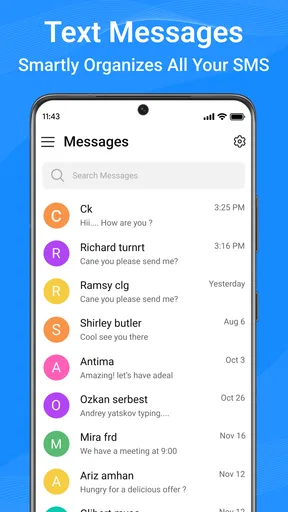
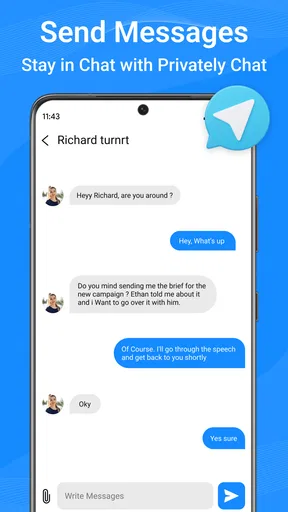
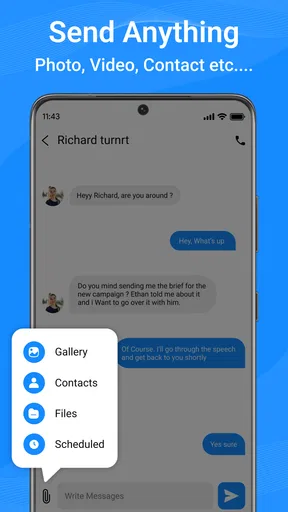
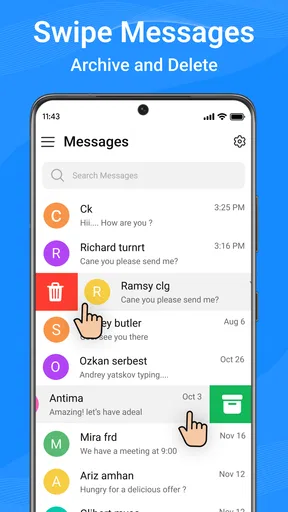
 Analysis by AppCompare
At home, texting is often less about long conversations and more about small pieces of coordination: a changed pickup time, a grocery item someone forgot, or a quick note that the front door is open. I tried Messages: Text SMS with those ordinary exchanges in mind. It is a communication app for SMS, and its appeal is straightforward: it gives everyday messages a more adjustable, easy-to-scan home without asking the whole household to adopt a separate chat service.
One phone, many everyday conversations
In a shared household, the useful test is whether an app makes routine messages easier to handle without blurring who is talking to whom. SMS already has a practical advantage here: people can contact one another through their phone numbers instead of needing everyone to join the same online group. I find that helpful when one person prefers a basic phone workflow or when a relative is comfortable with texts but not with another account-based messenger.
A realistic example is a busy afternoon when one person is running late and another is checking whether dinner plans have changed. A short text can be read quickly, answered when convenient, and revisited later if the details matter. Customization can make the inbox feel more personal, while search is potentially useful when the address, time, or shopping detail has slipped out of mind. The practical benefit is not that texting becomes a full household planner; it is that small decisions can stay in familiar conversations.
Keep the device and account boundaries clear
Before making any messaging app the household default, I would decide whose phone it is and who is expected to read its notifications. A shared device can make coordination convenient, but it can also expose private conversations on a lock screen or leave one person replying from another person’s number. That is a device-use issue, not something a new SMS interface automatically solves.
I would also check which app is selected for sending and receiving SMS before relying on it for an important exchange. On a phone used by more than one person, this small setup check can prevent confusion about where new messages arrive. If a device changes hands, take a moment to confirm the active messaging setup and notification preview choices rather than assuming the previous arrangement still fits.
Useful for coordination, not a shared task board
Text threads work well for quick decisions, but they are easy to mistake for a durable household record. I would use a conversation to settle who is collecting a parcel, then put a recurring chore or appointment somewhere designed to track tasks if everyone needs to see its status later. Search can help recover a past detail, yet it is not the same as a shared calendar with reminders and a clear owner.
There is another small trade-off with SMS: a message may be brief and easy to send, but a thread can become noisy when several people are discussing different plans. I find it useful to put the key detail early in the message—such as the time or location—rather than burying it in a string of replies. That habit makes texts easier to scan regardless of theme or phone model.
Worth Reading Before You Choose

EA SPORTS FC Mobile 26 Is a Bigger Football Game, but It Takes Time

Flipboard Shows What News Apps Must Do Beyond the Feed

Switching to Android Auto Means Rethinking Your Driving Routine

Google Calendar Makes a Crowded Week Easier to Manage

Ludo King Makes the Most of the Minutes Between Plans

Baby Panda World Brings Quick Play to Modern Phones, but Its Game Library Feels Busy
Age, comfort, and trust
The app is rated for Everyone, which makes it suitable for a broad audience in the store’s age-rating sense. That should not be confused with household supervision or a promise that every conversation is appropriate. For a child using a family device, an adult still needs to set clear expectations about who may use the phone, what information should not be sent, and how to ask for help if a message feels uncomfortable.
I would be especially careful not to treat a messaging app as a substitute for those conversations. A familiar interface may lower the barrier to texting, but it does not establish family rules, verify who is using a device, or make every contact trustworthy. For an older relative, by contrast, a simple SMS routine can be a comfortable way to keep in touch without asking them to learn a new social platform.
All About the Interface
First off, let's talk about the interface. It’s like going from a tricycle to a Ferrari—smooth, intuitive, and just downright sleek. The app opens up with a clean and minimal design that makes it super easy to navigate. I didn’t have to spend hours figuring out where everything was, which is a massive plus. Everything is laid out in a way that feels natural. Sending a text or starting a new conversation is just a tap away.
Features That Stand Out
Now, what really sets Messages: Text SMS apart is its feature set. It’s packed with all the goodies you’d expect from a top-tier messaging app, and then some. Let’s dive into what makes it tick:
- Customization Options: You can tweak the theme to suit your mood. Feeling blue? There’s a theme for that. Want something bright and cheerful? You're covered.
- Advanced Search: Finding that old text message from months ago is a breeze. The search function is powerful, and I love how it pulls up results in a flash.
- Quick Replies: For those times when you're in a rush, the quick reply options are a lifesaver. Just tap, send, and you’re done.
- Emoji and GIF Support: What's a text without a little pizzazz? The app has a vast library of emojis and GIFs to spice up your chats.
These features make everyday texting far more enjoyable and efficient. Plus, the app is constantly being updated, so there’s always something new around the corner.
Performance and Reliability
Performance-wise, this app is a beast. I’ve been using it for a good while now, and I haven’t experienced any lag or crashes. Messages send instantly, and I’ve never missed a notification—a hallmark of a reliable app. Whether I'm on Wi-Fi or mobile data, the app performs flawlessly.
Battery life is another concern when it comes to apps like these. Thankfully, Messages: Text SMS doesn’t drain my phone’s battery like some other apps I’ve used in the past. It’s lightweight and efficient, which is exactly what you need from a messaging app.
Security Features You Can Trust
In today’s digital age, security is paramount. And this app takes it seriously. With end-to-end encryption and robust privacy controls, I feel safe knowing my messages are protected. It’s peace of mind that’s hard to find with many other apps out there.
Moreover, the app offers secure backup options. So, if you switch devices, you won’t lose your precious conversations. It’s little touches like these that make Messages: Text SMS a standout choice.
How it fits beside other messaging choices
In the wider SMS messaging category, this app is best judged against the texting app already on your phone, not only against internet-based messengers. A default SMS app is often the least disruptive option: it is already in place and may suit someone who wants no extra customization. Messages: Text SMS is more appealing if you want to adjust the look and use the listed search and quick-reply tools as part of a more tailored routine.
It is not automatically a replacement for a group-chat service. People who rely on internet messaging for richer group features, cross-device continuity, or a shared online space may prefer to keep that service for those conversations. SMS is strongest for direct, familiar exchanges; it is less suited to turning a household into a managed community with assignments and persistent plans. I would choose the tool based on the conversation, rather than expecting one app to handle every kind of coordination.
Small habits that make texting work better
One practical way to get more from search is to make messages themselves easy to find: include a distinctive word, place, or time in the text when you are sharing something you may need to retrieve. For example, a note that says “parcel at the side entrance” is easier to locate later than a vague “it’s there.” This is a simple writing habit, not a special feature, but it makes an inbox more useful when household details accumulate.
Quick replies are most valuable for low-stakes acknowledgements—confirming that you saw a message or giving a short answer while your hands are occupied. I would still write a complete message when timing, safety, or instructions need to be unambiguous. A fast response can save effort, but speed is not a substitute for checking that the person receiving it understands the plan.
Theme choices are a personal convenience rather than a privacy safeguard. A distinct visual style may help someone recognize their own messaging screen on a device they use regularly, but it should not be relied on to separate people’s accounts or conversations. If several household members share one phone, clear device rules matter more than appearance.
What to expect before switching
The app is free, and its current version is 1.54. It was released on December 1, 2024, and is listed for Android 7.0 or later. Its average rating is 4.3 from around 31,000 ratings, with about 269 written reviews and over one million installs. Those figures suggest that it has attracted a substantial audience, but they cannot tell me whether it will suit a particular phone or household routine.
Because this is an SMS app, I would think about the role it will play before changing habits. If you mainly need a straightforward way to send ordinary texts, the switch should be considered in terms of the interface and daily workflow, not as a promise of broader social features. If you want a single space for calls, video, large groups, or shared planning, a dedicated communication service may be a better fit alongside SMS.
One point worth checking on your own device is whether the features you care about fit the way you actually text. Try searching for a known conversation, changing the appearance to something comfortable, and using a quick reply in a low-pressure exchange. Those simple trials reveal more than browsing a feature list: you can see whether the app feels clear on your screen and whether its shortcuts match your habits.
Who should choose it—and who may not
I would recommend it to someone who uses SMS often, wants more say over the messaging screen, and values being able to retrieve old details without digging through long threads. It also makes sense for a household member who wants to keep ordinary coordination in familiar text conversations rather than persuading everyone to install and learn another messenger. Its age rating is Everyone, and the app is free, which lowers the barrier to trying it.
I would skip it if you are already happy with your phone’s default SMS app and have no interest in changing how it looks or works. I would also avoid treating it as a family monitoring tool, a shared calendar, or a guarantee that messages are private in every situation. The app’s communication role is narrower than those needs, and choosing a purpose-built option—or keeping the existing setup—can be the more sensible choice.
Wrapping It Up
So, what’s the final verdict? Messages: Text SMS is more than just an app—it's a complete messaging experience. With its user-friendly interface, robust features, and rock-solid performance, it’s a must-try for anyone looking to upgrade their texting game. Whether you're a casual texter or a messaging mogul, this app has something for everyone.
If you’re curious to give it a whirl, you can find the download links on our site. Trust me, once you try it, you might just wonder how you ever texted without it!
A practical household verdict
For household use, I see this as a personal SMS app that can make routine conversations feel more comfortable, not as a system for managing family life. It can suit adults, older relatives, and confident young users when the phone itself is set up thoughtfully and expectations about contacts and replies are clear. Its value is in helping people handle texts in a way that feels convenient to them.
The app is made by Phone call and belongs to the communication category. My recommendation is measured: try it if the default texting experience feels limited and you want customization, search, and quick replies in one place. Keep another tool for plans that need reminders or shared status, and keep household boundaries separate from app features. That is the most honest way to get value from it without asking an SMS app to do a job it was not designed for.
Pros
- User-friendly interface for easy navigation.
- Supports group chats and multimedia sharing.
- Reliable message delivery with notifications.
- Customizable themes and chat backgrounds.
- Works offline with queued messages.
Cons
- Lacks end-to-end encryption for security.
- Ads can be intrusive in the free version.
- Limited customization for notifications.
- No support for video calls or VoIP.
- Occasional delays in message syncing.
FAQs for Messages: Text SMS
What features does Messages: Text SMS offer beyond basic texting?
Messages: Text SMS goes beyond simple texting by providing multimedia messaging, group chats, and a variety of customizable themes. Users can also enjoy features like message scheduling, quick replies, and secure backup options. The app integrates seamlessly with your contacts, ensuring a smooth and efficient communication experience.
Is Messages: Text SMS secure and private?
Yes, Messages: Text SMS prioritizes user privacy and security. The app includes end-to-end encryption for messages, ensuring that only you and the recipient can read them. Additionally, it offers password protection for accessing the app, providing an extra layer of security for your private conversations.
Can I use Messages: Text SMS across multiple devices?
Messages: Text SMS supports multi-device access, allowing you to sync your messages across your phone and tablet. This feature ensures you can stay connected and continue conversations seamlessly, regardless of which device you're using at the time. All you need is a stable internet connection and logged-in account.
How does the app handle multimedia messages?
The app efficiently handles multimedia messages, allowing users to send and receive images, videos, and voice notes with ease. Messages: Text SMS compresses files to ensure quick sending without compromising quality. The app also supports various file formats, making it versatile for different media types.
Are there any customization options available in Messages: Text SMS?
Absolutely! Messages: Text SMS offers extensive customization options. Users can personalize their chat backgrounds, choose from a variety of themes, and adjust font styles and sizes. Notifications can also be tailored with custom tones and vibrations, allowing you to create a unique messaging experience that suits your preferences.


